Ask a few people what you should build your website with and you’ll probably hear several confident answers.
The designer likes one option. Someone you know runs a shop on another. A developer suggests something you’ve never heard of and says it will be faster.
That doesn’t help much when all you want is a website you can use without regretting the decision a year later.
I work with WordPress and Shopify, alongside bespoke development when the project calls for it. My starting point is what the business needs to do, including the fairly ordinary jobs you’ll be doing after launch.
First, these aren’t three completely separate boxes
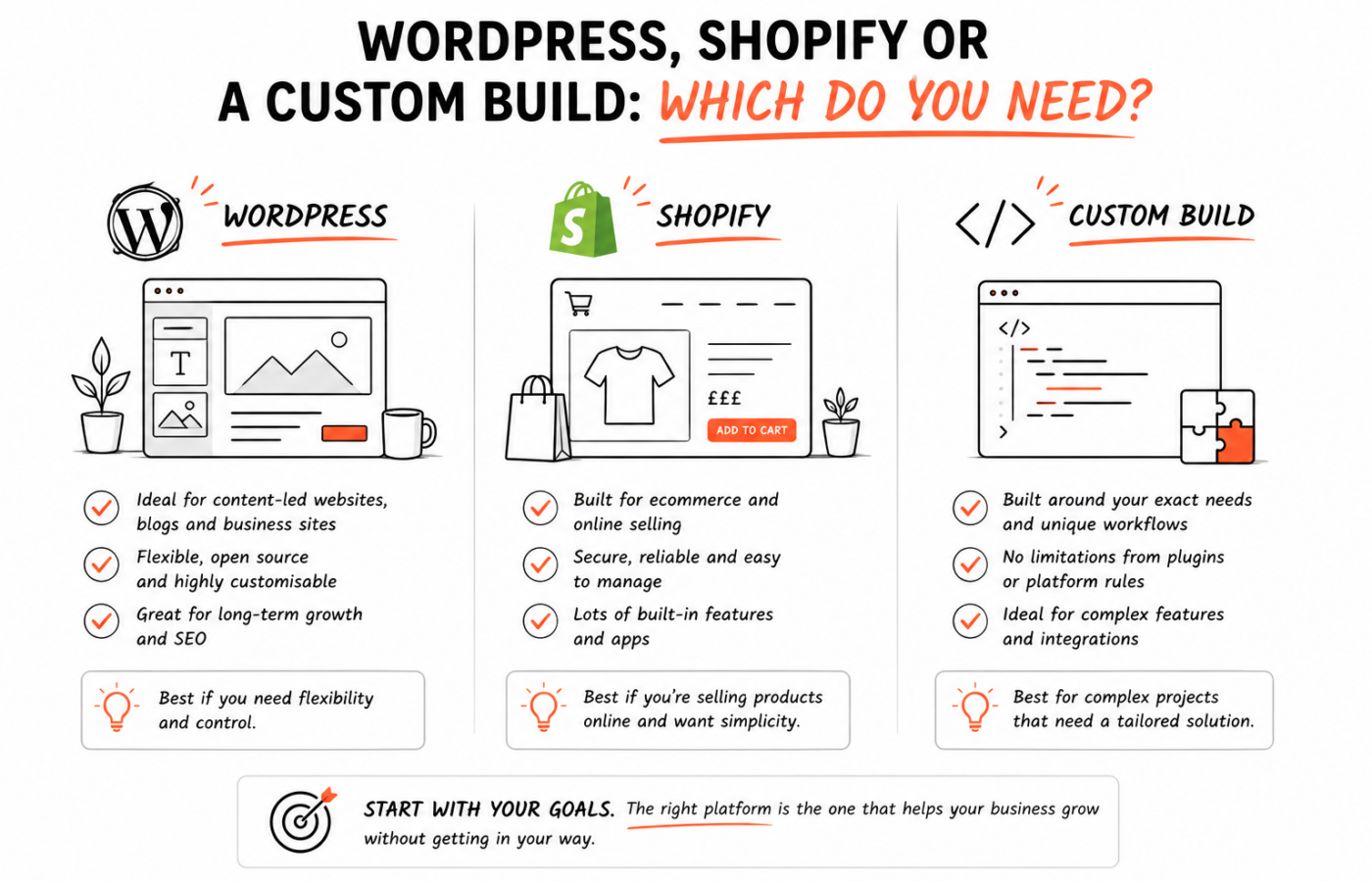
WordPress and Shopify are platforms. “Custom build” describes an approach, and people use the phrase rather loosely.
A WordPress website can have a completely bespoke design and custom functionality. A Shopify shop can use a theme developed specifically for the business. You don’t have to abandon a familiar platform to get something that feels like your own.
Then there are websites and applications built around a more individual technical setup. They might use a separate content system, connect to several services or handle a workflow that doesn’t fit comfortably into an ordinary website platform.
When somebody offers a custom build, ask what they mean. Are they customising the design? Writing a theme? Building an application? The answer matters more than the label.
Start with the work you’ll do each week
Imagine it’s a few months after launch. You’ve forgotten most of the conversations about technology and you’re getting on with running the business.
What are you opening the website dashboard to do?
For a service business, it could be adding a case study or changing the details of an offer. For a retailer, it might be updating stock and checking an order. A membership business could be managing access to content.
Those everyday tasks should influence the choice early. A platform can produce a beautiful homepage and still be an awkward fit for the people responsible for maintaining it.
I also want to know what already exists. If you have accounting software, a booking process or a large product catalogue, we’ll need to understand how the new website fits around it.
Where WordPress makes sense
WordPress is worth considering when publishing and managing content are a large part of the job.
That could be a business website with service pages and case studies, an author’s site with books and articles, or a publication with different kinds of content. Its block editor supports modular content, including custom blocks built for a particular website.
The editing experience depends heavily on how the site is put together. A thoughtful setup can give you straightforward controls for the things you change regularly. A careless one can leave you trying to work out which of several overlapping editors owns a heading.
So I wouldn’t judge WordPress purely by an old website you found difficult to update. I’d want to see how the proposed new build will work.
WordPress can also support an online shop through WooCommerce. That deserves a proper look if the business needs commerce alongside a substantial content website, or has requirements that suit that ecosystem. It isn’t limited to blogs, and Shopify isn’t the only way to sell products.
The responsibility question matters here. With a self-hosted WordPress setup, you need an arrangement for hosting and software maintenance. That can be handled for you, but it still needs an owner and a budget.
Where Shopify makes sense
If selling products is the centre of the business, Shopify is a sensible option to investigate.
Its appeal is partly practical: the platform brings store management and the website together, and hosting is included. You aren’t starting with a general website and assembling every part of the shop yourself.
That doesn’t mean the work is already done.
Someone still needs to organise the catalogue, make product pages useful and configure the shop around how you actually trade. The theme needs attention too, particularly if you want a distinctive design or have products that require more explanation than a photograph and a price.
I’d look closely at any unusual requirements before committing. Trade pricing, complex product options or connections to existing systems may affect the plan, apps and development work required. The exact setup needs checking against the features available at the time.
There are ongoing costs beyond the initial build. Shopify’s current pricing page is the place to check plan details; any proposed paid apps need to be included in the conversation as well.
The convenience can be valuable. Just make sure you’re choosing it with a realistic view of the whole shop.
When a more bespoke setup earns its place
Sometimes the main feature isn’t really a conventional website feature.
Perhaps customers need to log in and follow a project through several stages. Perhaps a quoting tool has to calculate a result from business-specific rules, then send information to another system. You may be building a service that people use, rather than pages they read.
That’s where a more individual approach may be worth exploring.
It doesn’t follow that everything should be written from scratch. Existing platforms and services may still handle parts of the job. The useful work is deciding what needs to be custom and what can rely on something established.
I would be cautious about choosing a complicated setup simply because it sounds impressive. A small brochure site needs a good reason to become a software project.
There also needs to be a credible handover. Who can maintain it? Where does the code live? How will another developer understand the setup if you need them in future?
Those questions belong in the initial discussion, while there is still time to make different choices.

WordPress
A strong starting point when publishing and managing content are a large part of the job.

Shopify
Worth investigating when selling products is the centre of the business.

Bespoke
Worth exploring when the main feature is not really a conventional website feature.
| Starting points | WordPress | Shopify | Bespoke |
|---|---|---|---|
| Common starting use | Service-led sites with regularly updated content | Businesses centred on online retail | Unusual interactive services or workflows |
| How content is managed | Depends heavily on how the site is put together | Store management and the website sit together | Needs a credible handover and a place for the code to live |
| Maintenance responsibility | Hosting and software maintenance need an owner | Hosting is included; plans and apps still need budgeting | Who can maintain it later belongs in the first discussion |
| Questions to check | Show me how I would add a case study | How would I update product information in bulk? | What happens if another developer needs to take over? |
Think about the editor before the homepage
You don’t need to choose the entire visual design around a dashboard. But you should see how content will be managed before agreeing to a build that depends on frequent updates.
Ask for a demonstration using a task from your business.
“Show me how I’d add a new development and attach its properties” is more useful than “Is it easy to use?” So is asking how you’d update product information in bulk if you have a large catalogue.
An answer that involves a developer every time may still be acceptable for a rarely changed feature. It becomes more expensive and frustrating when it applies to something you need to do every Monday.
Moving later is possible, but it is still a project
You aren’t necessarily stuck with your first platform forever. But switching is more involved than copying the colours onto a new homepage.
Content has to move. Product information may need reshaping. Existing page addresses need attention, and connections to other systems may need rebuilding.
That doesn’t mean you should buy the most elaborate option now in case you grow. It means the expected next stage of the business is worth discussing.
If you know an online shop is coming in six months, say so. If it’s a vague possibility for some distant future, don’t let it dictate every decision today.
A practical way to narrow it down
For a service-led website with regularly updated content, I’d often start by looking at WordPress. For a business centred on online retail, Shopify belongs in the discussion early, with WooCommerce considered where the requirements make it relevant.
If the central job is an unusual interactive service or business workflow, I’d explore whether a more bespoke setup is justified.
These are starting points. They aren’t verdicts on a project I haven’t seen.
The right choice should be explainable in ordinary language. You should understand why it suits the work, what it costs to keep running and how you’ll manage it.
You don’t need to arrive knowing the answer. That’s part of what a developer can help you work out.